How to Redeem Cast For Fish Codes
Settings → paste → claim. Troubleshooting for typos, delays, and already-used codes.
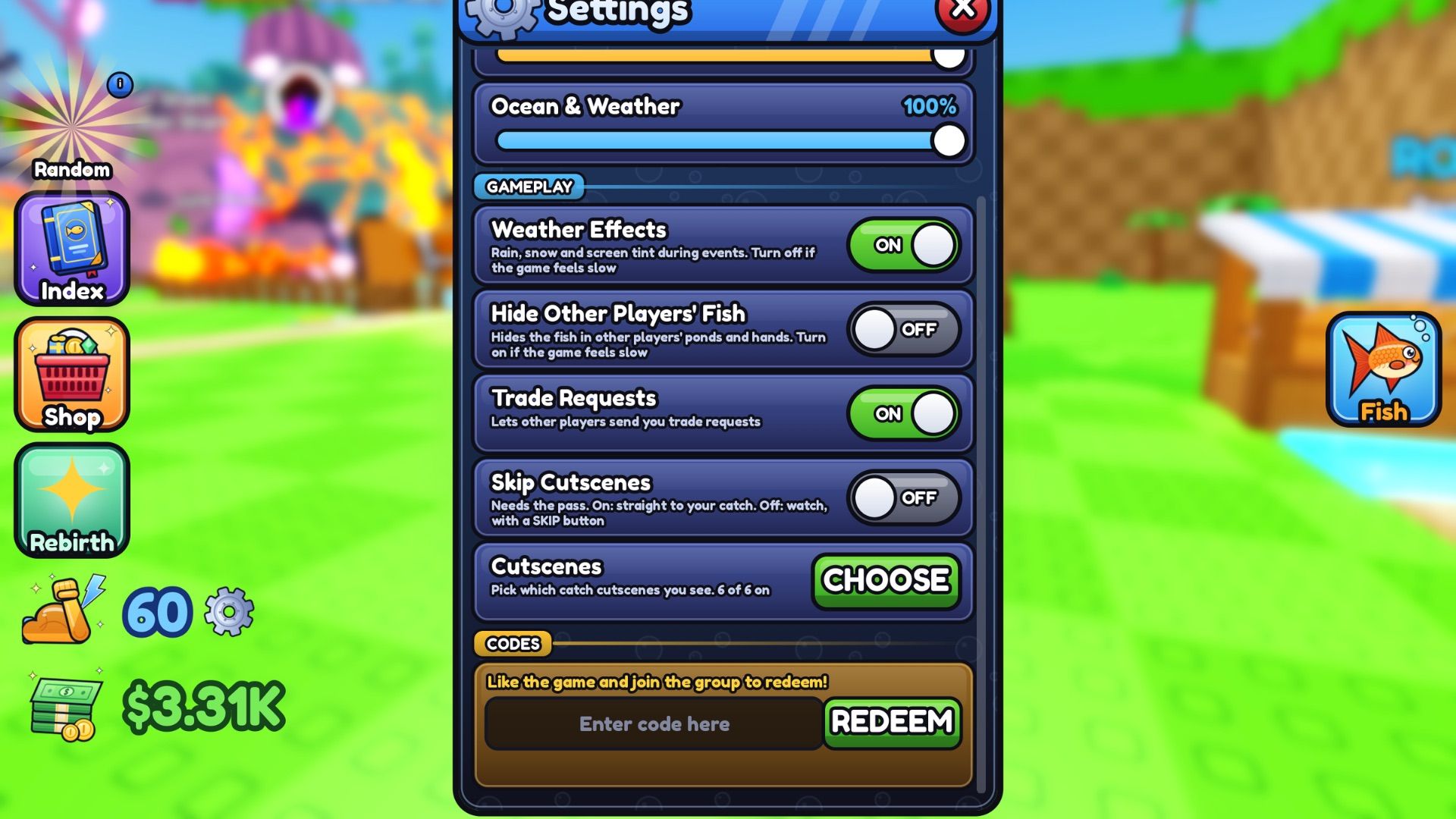
Redeeming Cast For Fish codes takes less than a minute once you know where the box lives. The studio put promo entry inside Settings, not a separate shop tab, so new players often miss it. This guide walks through the exact flow on PC and mobile, explains what a successful claim looks like, and covers every common failure mode we see in Discord and creator chats.
Before you start, open the live list on the Codes Hub so you have RELEASE, FISHY, CASTAWAY, and LUCKY20 ready to paste. Codes are case-sensitive in most Roblox experiences — type them exactly as written.
Step-by-step redeem (desktop & laptop)
- Launch Roblox and join Cast For Fish! by Cmnbltz Studios.
- Wait until your character loads on the fishing plot and the HUD finishes spawning. Redeeming mid-teleport can fail silently.
- Open the Settings menu from the on-screen UI (gear / menu control — not the Roblox Escape menu alone).
- Find the Codes or promo text field inside Settings.
- Click the field, paste one code, and remove accidental spaces before or after the string.
- Press the Claim / confirm control.
- Watch for a success toast or an immediate bump to Cash, Cast Power, or Lucky Casts.
- Close Settings, then open your relevant panels to double-check the reward landed.
- Repeat for each remaining code. Do not mash the same code twice — already-redeemed entries usually return an error.
Step-by-step redeem (mobile)
- Open the Roblox app, search Cast For Fish, and join a server (server size is small — typically five players).
- Rotate to landscape if the Settings button is easier to hit that way.
- Tap Settings, then tap the code input so the on-screen keyboard appears.
- Paste from your notes app rather than retyping long strings on a phone keyboard.
- Claim, dismiss the keyboard, and verify counters. Mobile toasts can be easy to miss behind the UI.
If the paste button fails, type carefully: LUCKY20 has digits; CASTAWAY and RELEASE are easy to mistype as Castaway or Realese.
What you should receive
Cross-check rewards against the Codes Hub table:
- RELEASE → 3 Lucky Casts
- FISHY → Cash (coverage currently cites about $6.15B)
- CASTAWAY → +5 Cast Power
- LUCKY20 → 20 Lucky Casts
After CASTAWAY, glance at your Cast Power readout before your next throw — even a small bump can change which band of water you reach. After FISHY, visit shops for bait and rods; idle Cash sitting unused does nothing for pond income. After Lucky Cast codes, decide whether to spend immediately or save for a zone that can drop Index targets — see Zones and the Fish Tier List.
Troubleshooting: code did not work
Work through this list in order before assuming the code expired.
Typo or extra space. Delete the field and paste again. Watch for leading spaces from chat apps.
Wrong game. Codes for Fisch, Net a Fish, or other fishing experiences will never work here. Only Cast For Fish strings on the Codes Hub belong on this page.
Already redeemed on this account. Most Roblox codes are one redeem per account. Alts need their own redeem if the studio allows it; sharing one claim across accounts does not work.
Server desync. Leave and rejoin, or hop servers, then try once more. Brand-new games sometimes hitch during busy evenings.
Still patching. After a shutdown, wait until the experience fully loads before opening Settings.
Expired or disabled. When the studio turns a code off, you will get a failure message even with perfect spelling. We will move dead codes to the Expired section on the hub. As of November 2026, no expired codes are listed yet.
Platform clipboard issues. On consoles or locked-down school devices, type manually and double-check every character.
Redeem order for new accounts
If you just finished the tutorial:
- Redeem FISHY and buy your first meaningful bait or rod upgrade.
- Redeem CASTAWAY and take a few practice casts to feel the extra distance.
- Follow Getting Started so you place early fish into the pond instead of discarding value.
- Hold most of LUCKY20 (and RELEASE) until you can reach mid zones where rare sizes and mutations actually appear.
- Skim Cast Power so training and code power stack instead of competing for attention.
Veterans who already have deep zones unlocked can burn Lucky Casts immediately on Index holes, then dump Cash into late rods and plot upgrades.
After you redeem: what to do next
Codes are a head start. Long-term progress still comes from training Cast Power, filling the Index across ~182 fish, placing earners in your pond, and planning rebirth only when you understand the reset. Use the Tier List Hub when choosing which catches to keep on display versus which to prioritize for income. Track missing Index entries with the Index Checklist.
When a patch lands, re-open Settings and test whether new codes shipped. The studio has been active since the ~10 November 2026 launch through updates around 22–23 November 2026. Patch summaries live under Release Notes and the Updates Hub.
How to hear about new codes first
Join the official Discord: https://discord.com/invite/tVjPMg3WK. Enable notifications for announcement channels if the server offers them. Cross-check anything you see on social media against Discord or this wiki before redeeming — phishing “codes” that ask you to visit odd sites are not real promo strings.
Also bookmark:
- Codes Hub for the working table
- Wiki Links for Roblox + Discord + category map
- Players / Community for creator discussions about drops
Safety notes while redeeming
Never enter your Roblox password into a “code generator” website. Real Cast For Fish codes are short strings you paste inside the game. Never run executor scripts just to auto-redeem codes; that risk is unrelated to claiming free Cash. If you later research automation tools, read the Scripts Hub warnings first — we do not publish unverified loadstrings for this brand-new title.
FAQ-driven quick reference
| Situation | Action |
|---|---|
| Cannot find Codes UI | Open Settings, not the Roblox main menu alone |
| Success toast but no Cash | Rejoin and re-check; verify you looked at the right currency panel |
| Want more codes | Discord + this hub after each update |
| Unsure which reward to use first | Cash and Cast Power early; Lucky Casts for targeted rare hunting |
| Planning a full account reset | Read Rebirth before spending Lucky Casts you will keep or lose per current rules |
Redeeming correctly takes thirty seconds. The real skill is spending the rewards on the right upgrades — rods, bait, pond placement, and zone progression — so every free Lucky Cast and Cash tick compounds into Index progress instead of idle clutter.
Frequently Asked Questions
Quick answers to the most common Cast For Fish questions.
Where is the code box in Cast For Fish?
Inside the in-game Settings menu. Open Settings, paste the code into the promo field, and claim. It is not in the Roblox website redeem page.
Why does my code say it is invalid?
Check spelling and spaces, confirm you are in Cast For Fish (not another fishing game), and make sure you have not already redeemed it on that account. If it still fails, the code may have been disabled.
Can I redeem the same code on multiple accounts?
Each Roblox account generally needs its own redeem. Codes are almost always limited to one successful claim per account.
Do I need to be a certain level to redeem?
Current Cast For Fish codes do not list a level gate in public coverage. If a future code adds a requirement, we will note it on the Codes Hub.
Where are new codes posted?
Official Discord at discord.com/invite/tVjPMg3WK, then mirrored on the Codes Hub after confirmation.